Atlas

Every drive. One search.

Atlas indexes every external drive, plugged in or not, into one instant search. Find the file, then fetch the right drive.

Your shelf

Every drive, exactly where it lives.

Each drive is drawn the way it looks on the shelf and grouped by where it lives. Click one to see its capacity, who has it, the project it belongs to, its folders, file types and what is backed up elsewhere.
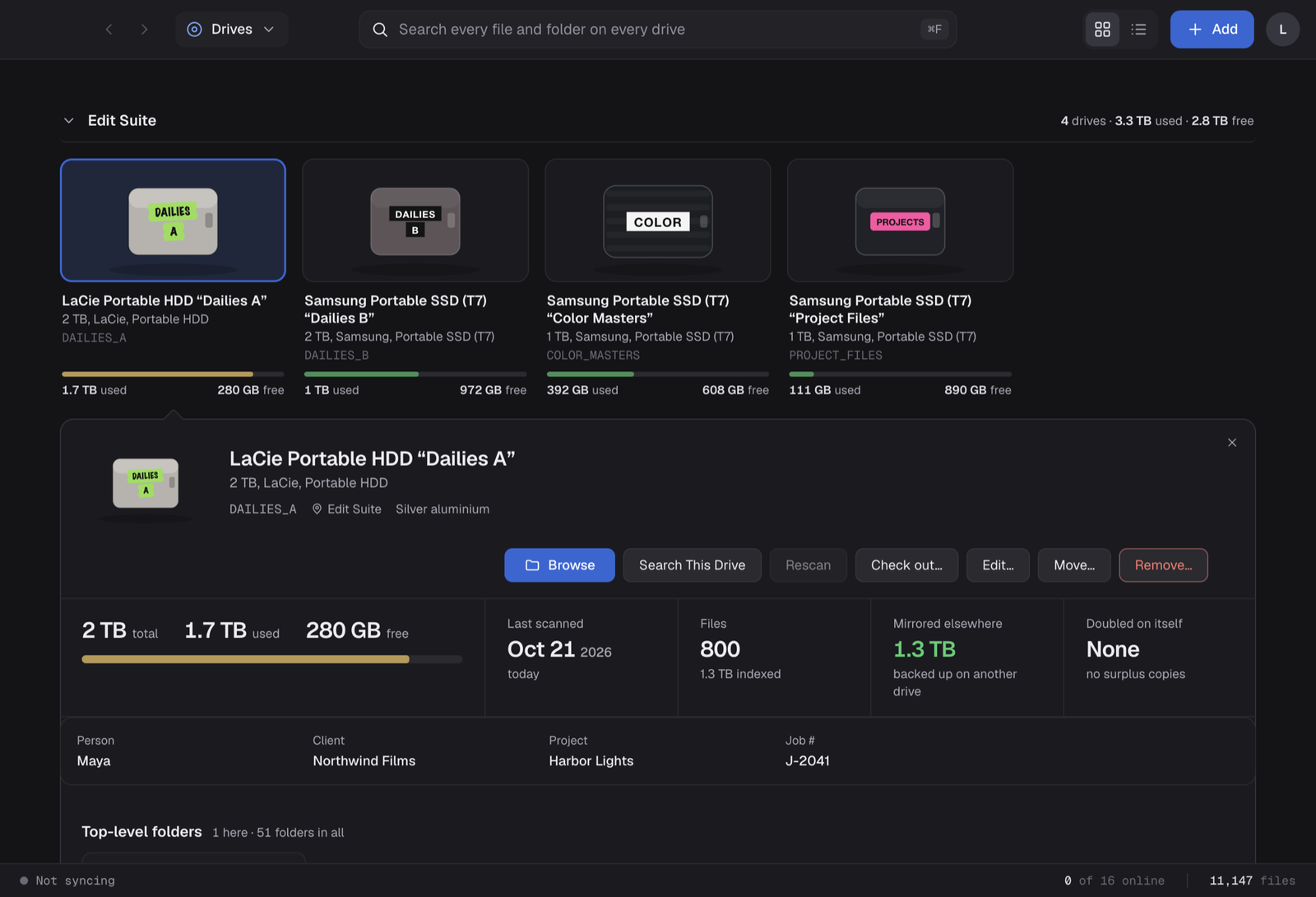
Drives grouped by location, with one drive open to show its capacity, scan date, mirrored size, person, client and project

Capacity you can read

Used and free space on every card, amber at 85% and red at 95%, always with words.

Project details

Record the client, agency, project, job number, director and date on each drive, and find it by any of them.

Everything one click away

Browse it, search just that drive, rescan it, check it out, edit it, move it or remove it.

Search

Millions of files. One search box.

One search bar, always at the top. A local SQLite full-text index covers every file on every drive, mounted or not. Matching drives appear first, then folders, with identical copies grouped so you see each folder once. Typical searches take 15 to 130 ms across 3 million files.

Search results for 'harbor': matching drives, then folders grouped by copies, each with where it lives

Where is it?

Select a result and Atlas tells you the shelf, bag or person to walk to, and whether any copy is plugged in right now.

Narrow it down

Filter by drive, file type or number of copies, search filenames only, or switch to every copy.

Works unplugged

Search never needs the drive. The catalogue stays on your Mac and works offline.

Browse

Browse drives that aren't plugged in.

Open any drive, plugged in or not, and walk its folders with sizes, item counts and a copies badge on everything that exists somewhere else. Answer “which drive has Day 3?” without a cable.

Browsing one drive: its space meter, folder list with copies, and a panel listing the other drives that hold the same folder

Also on

Every folder lists the other drives that hold it, and how much of it each one has.

All drives at once

Switch to the all-drives tree, filter by person, and expand folders across the whole shelf.

Keyboard first

Arrow keys, up one folder, back and forward, and a switcher between drives. Dotfiles and drive clutter stay hidden.

Copies

Backup, or just taking space?

Two copies on two drives is a backup, and Atlas checks whether both sit in the same bag. Two on the same drive is surplus, and Atlas totals the space you can reclaim. Matching is by name and exact size, with renamed copies linked by size, date and folder structure. Atlas only lists, and never deletes.

Copies view showing 3.8 TB genuinely backed up, with each drive pair marked as kept in different places

Safe to delete

Surplus, three-plus copies and same-drive doubles, each with the reclaimable total.

Backup pairs

Every mirrored pair, with a clear flag when both drives live in the same place.

Compare two drives

Pick any two drives and see exactly what they share, folders or files.

Locations

Every room, cabinet, shelf and box.

Describe where drives really live. Locations nest up to three levels, such as a room, a cabinet and a shelf, or a cupboard and its archive boxes. Name a person for any place, mark it off-site, and drag a drive to move it.

Locations board with an edit suite, machine room, vault, on-location bag and an off-site house, plus a checked-out drive

Open a cabinet, see every shelf.

Each place shows what is inside it, its count, and who looks after it. Move a whole shelf or box and everything in it moves too.

Cabinet 1 open, showing Shelf 1 with two backup drives and Shelf 2 with one drive

People

Who looks after which drives.

Give every drive an owner and see each person's drives, total size and files in one card. Call them People, Editors, Artists, Photographers or anything you like, and the whole app follows.

People page with a card each for Leo, Maya and Sam showing how many drives, terabytes and files they look after

History

Who took which drive, and where it went.

Check a drive out to a person or a post house, with a note and a due date, and check it back in when it returns. Moves, rescans, additions and edits are logged too, with who did it. Anything overdue is flagged at the top.

History screen with the drives checked out right now at the top and a filterable log of every event with notes and people

Team sync · Live in beta

One catalogue for the whole house.

A post house has a dozen people and hundreds of drives. Team sync gives everyone one shared catalogue, kept current in the background.

Local-first sync

Search works offline. Changes sync in the background, with a live status bar showing progress.

Shared shelves

Locations, people, check-outs and moves reach every Mac, and other people's edits appear in place.

Full history

Every edit is kept with who made it and when, on the server's clock.

Sign-in and invites

Email sign-in. Teammates join with a one-time invite code, and everything lives in Settings.

Admin

Runs the studio

Manages people and the account.

Editor

Keeps it current

Scans drives and edits the shelf.

Viewer

Finds what they need

Searches and browses, read-only.

Photo to icon · Live in beta

Snap a photo. Get the icon.

Drop a photo of a drive into Atlas and it reads the brand, model, capacity and label, then draws the icon: the shape, the colour, the tape and the lettering. If a person is named on the label, the drive is assigned to them. You review every field before saving.

Edit drive dialog with a live icon preview, a drop box for a photo of the drive, and fields for location, person, brand, model and project

Read-only scans

Atlas never writes to your drives. A stopped scan changes nothing.

Your Mac, too

Index your home folder or startup disk alongside your drives, or add a drive without scanning it.

Fast rebuilds

Only drives that changed are re-read, and the search index updates in the background.

Built for the Mac

Apple silicon, menu bar, undo, keyboard control, and light or dark to match your system.

Beta

Where Atlas is today.

Search, duplicate analysis, locations and team sync are built and tested.

Working now

  • LIVEBuilt for scale. Tested with 3.7 million files across 42 drives.
  • LIVENested locations. Rooms, cabinets, shelves and boxes, three levels deep.
  • LIVECheck out and check in. To a person or post house, with a due date and notes.
  • LIVEPeople and projects. An owner, client and job number on every drive.
  • LIVETeam sync. Accounts, roles, invites and a shared catalogue across Macs.
  • LIVEDuplicate analysis. Backups and surplus copies, told apart.
  • LIVEPhoto to icon. Photograph a drive and Atlas fills in the details and draws it.
  • LIVELight and dark. Follows your system, or choose in Settings.

Coming next

  • NEXTSigned installer and auto-updates. Beta builds are installed by hand.
  • NEXTBilling. Plans for studios.
  • NEXTIntel Macs. Beta builds are for Apple silicon.